
Before we began this process we were directed to watch a video of past Cohort21 members’ reflections of their experience. It was here where inspiration began even before we even sat for our first F2F, and I recall one person saying “be prepared to stay up late thinking of these [new] ideas” (thank you @rutheichholtz) and truer words were never said.
I have to confessed I was slow to start, and I think it was mainly due to listening and working with people who shared so many fantastic ideas – everyone was so creative – that I couldn’t seem to figure out exactly what was the one thing I wanted to do as I wanted to do everything!
But clearly that wasn’t practical and I played with a few ideas, initially focusing on how could I find an effective and meaningful way to integrate observations/conversations in the math class; however, after going to the ISOMA math conference a new direction was found – create a personalised learning unit (thank you @clovrics and Kristy McGowan from HTS) where students would learn independently via a variety of different tools (reading, researching, watching videos). The Action Plan would get further clarified after the fine-tuning experience (thank you @ddoucet) when I realised what I wanted to focus on was finding effective ways to monitor and motivate students as they worked through the independent unit. Once that was decided it become clear that becoming a Google Form Master was in my future.
What did I learn:
- the power of docappender (thank-you @lmcbeth) – creating a running ‘dialogue’ with the students and having students keep a record of their thoughts/self-reflections throughout the unit
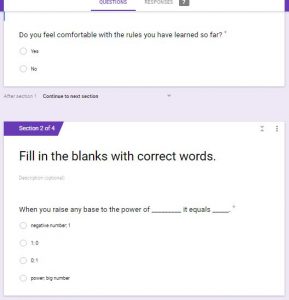
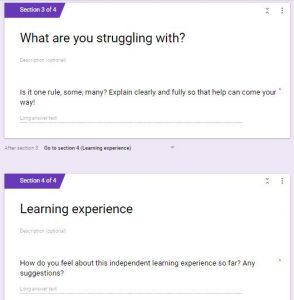
- that the way I have used forms before was pretty straightforward, but as seen in the images, I have learned to create sections for forms which I thought was so cool
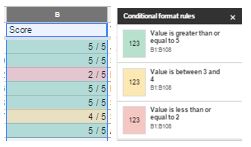
- created quizzes and learned how to have the results all consolidate in one workbook (thank you Tim Cooper @TYS) where I then used conditional formatting to see quickly how students where doing
- have students upload images of their completed work (via Google Form) which then led students to a link to another page where they could correct their own work (as part of monitoring they would then come to me to show me they have done so and I would sign their passport)
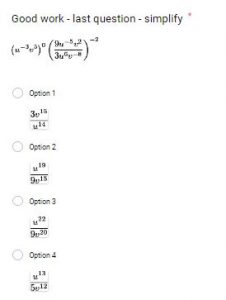
- how to use EquatIO which made creating math equations/questions for quizzes & exit cards to much easier
- when doing a unit like this – plan way ahead 🙂 as setting this up – the forms, the links, etc. – takes time, a lot of time, but the good news it’s done so all you have to do is small modifications for improvements
- be prepared for glitches as you will miss a link by accident, forget to select an answer for the quiz, etc., but that is okay as so far I have discovered it is an easy fix and since everything linked, the students will have an updated/correct version pretty instantaneously, and the students are quick to let you know when something is not quite right
- be prepared for chaos and walking a lot of kilometres as everyone is working at their own pace so you are moving around a lot
- see students really start to work with each other, help each other and not necessarily go to you first which is awesome (but you will still walk a lot of kilometres)
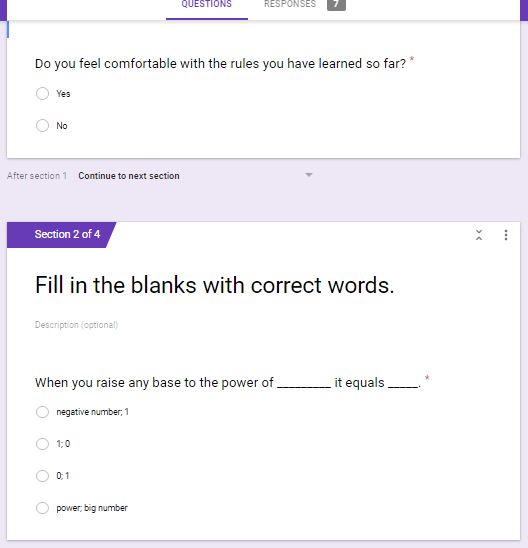


For me, everything I did for this unit was a big learning curve and it seem to happen in a very short period, but it was exciting too, seeing it all come together and ‘in action’. And as I, along with my colleagues, work through this unit, I am wondering ‘is all this technology may be too much’? I am not sure. A funny thing though, one of my students commented that the way this unit is laid out there are a lot more checks being done then they have ever experienced before – all the homework is definitely being done :), so the monitoring aspect has been achieved. But what about motivation? Well, the students are getting stickers every time they accomplished something which they like and they seem to enjoy working independently or in small groups, so perhaps they are motivated as they work? I am not sure yet as we have only been doing this unit for a week; please stay tuned.
So what’s next? Debriefing with my colleagues – was this a successful unit? What needs to change? Debriefing with my students – did they enjoy learning this way? What could/should be changed? But the next big step, and still working with Google forms, is to create a digital breakout box. I did a workshop with a physical breakout box which was a lot of fun and provided a different collaborative/cooperative learning experience. It was at the third F2F where I learned of the digital kind from @brenthurley and @lmcbeth, and I so want to do this as a culminating, fun activity for my students at the end of this unit. @adamcaplan has offered to work with me and I look forward to working with him to create one. Another thing to stay tuned for. I really think I am becoming a Google Form master.
As I mentioned before I started off slow, but working with and reaching out to the members of the Cohort21 community was brilliant. Being in a room with people sharing ideas, asking questions, brainstorming, etc., it was incredible and it truly fueled me to try different things and take risks. There are so many things I still want to try and I thank everyone that helped me on this journey. I look forward to sharing (and collaborating and asking and …) what I discover in the future with the Cohort21 community and my colleagues. Thank you.
“Every new beginning comes from some other beginning’s end” ~ Seneca
@lmiller You have had a super charged PD year! Cohort 21 + FDS + York PD + ISOMA = amazing growth. Your network has also grown as well. In your post you mention about 10 different teachers from across CIS Ontario schools who you can now connect with to answer questions and support you going forward. You are now officially the Yoda of Docappender 🙂
Well done Les!
J
Thanks so much Justin for all your help and support this year. This experience has been amazing and I have learned so much, and met so many great people. And knowing you were in my corner helped tremendously.
I am really looking forward to growing from this experience in different directions.
@lmiller –
This is a great summative post of your C21 experience! I love seeing others discovering the power of Google Forms, DocAppender, and Sheets! 🙂 Have you thought about extending your learning and doing the Google Certified Educator training and exams??
Jen
Hi Jen!
Thank you for your kind words. I am embarrassed to say that I have actually done all the lessons for Level 1 & 2, I just haven’t followed through with the exams. I really should though, shouldn’t I?
It is definitely on my agenda since I am getting so much more comfortable in the Google world.
Thanks again!